Pelican Invests
Pelican Invests is a financial platform designed to help families save for education through shared contributions and long-term planning. This project focused on improving how users engage with the service across key journeys, including fund creation, sharing, and gifting. Pelican is supporting a child's future success through streamlined management of their US tax incentivized 529 fund and simplifies the process, offering resources, tools, and transparent donation links that foster trust within the community.

Context
My Role
User Research
Information Architecture
Interaction Design
Visual Design
Focus Areas
Financial literacy
Onboarding
Dashboard architecture
User Flows
Usability Testing
Duration
May - June 2023
Tools Used

Pelican's Challenge

Pelican is a US-based financial platform built around 529 education savings plans, helping families save for a child’s future through shared contributions and long-term planning.
The existing dashboard worked, but it often felt difficult to understand where things actually lived. During early exploration, I kept running into moments where calls to action, saved profiles, and account-specific actions all blended together. It wasn’t always obvious what belonged to the user, what belonged to the child’s account, or where certain actions were supposed to happen.
The client originally approached us looking for a cleaner dashboard experience and better user flows, but after research and testing it became clear the problems ran deeper than visual polish alone. Users needed more guidance, better structure, and more confidence throughout the process, especially during onboarding and fund creation.
Research & Early Insights
We started with user interviews focused on parents and family members contributing toward a child’s education fund. A few patterns showed up almost immediately. Many users admitted they didn’t feel financially literate enough to confidently navigate 529 plans or estimate long-term education costs. Others felt uncomfortable asking friends and family for non-traditional gifts in the form of donations, even if they believed in the value of the platform. Trust also came up constantly. People wanted transparency around where their money was going, how funds were being managed, and whether the process felt secure. When it came to gifting, users wanted the experience to feel quick and straightforward. Several participants hesitated when basic actions became difficult to locate or understand.
At that point, the dashboard started feeling less like a visual design problem and more like an information architecture problem.

Roughly half of our interviewees admitted to not considering themselves financially literate.

Our users sought transparency and security, knowing where their funds were going, and how they would be used.

When it came to gifting, users wanted the process to be quick, intuitive, and for a good cause.
The insights from our interviews helped shape two core user groups: parents managing long-term education savings, and friends or family members contributing toward a child’s future through gifting. While their goals overlapped, their motivations and behaviors were often different. Parents focused more on planning, financial clarity, and long-term account management, while contributors cared more about trust, ease of use, and making meaningful contributions without unnecessary friction. These differences became important when thinking through onboarding, navigation, and how information was surfaced throughout the platform.


Pelican's Initial State
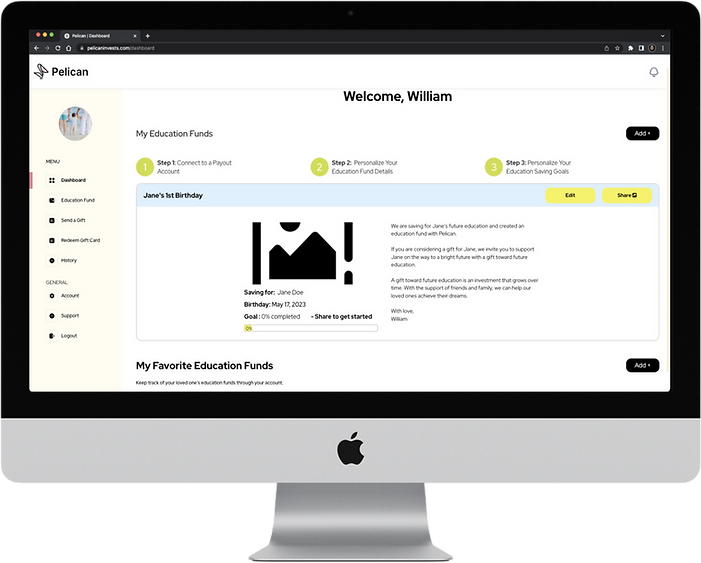
As the lead on this project, my initial thoughts and concerns with Pelican’s website centered around the existing information architecture and my struggle to differentiate between calls to action and what actually “belonged,” to account holders like Sam. As a team we discussed these concerns and ultimately decided that while the structure and frames that currently existed were functional and appropriately reflected Pelican’s branding, we needed to conduct a round of usability testing to identify pain points account holders struggled with to understand the current user journey.
Usability Testing
To better understand where users were struggling, we conducted usability testing around a first-time account creation flow.
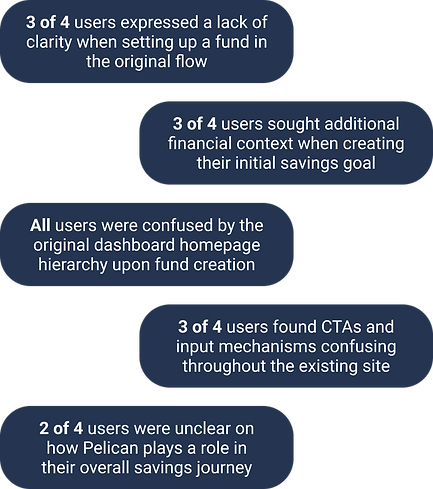
A few issues surfaced consistently:
-
users struggled to locate newly created funds
-
navigation felt redundant in places
-
calls to action lacked hierarchy
-
search and gifting flows were harder to complete than expected
-
onboarding lacked enough context around savings goals and education costs
None of our users completed the original search flow on their first attempt, and several weren’t sure whether they were interacting with their own account, a saved profile, or a contribution flow.
The more we tested the product, the clearer it became that the platform needed stronger structure and clearer ownership of information throughout the experience.
Restructuring the Dashboard
One of the biggest sticking points was a section called “Education Fund,” which grouped together saved funds, shared funds, and account-holder information in a way that felt cluttered and difficult to navigate.
Having saved profiles and education funds living in the same place felt redundant, especially when the platform already included a favorites feature. During ideation, I proposed removing the Education Fund section entirely and restructuring the dashboard around the account holder’s primary activity instead.
That change opened the door for a new feature called “My Events,” which allowed parents and loved ones to create short-term fundraising goals for birthdays, graduations, and other milestones while still keeping long-term account management centralized on the dashboard.
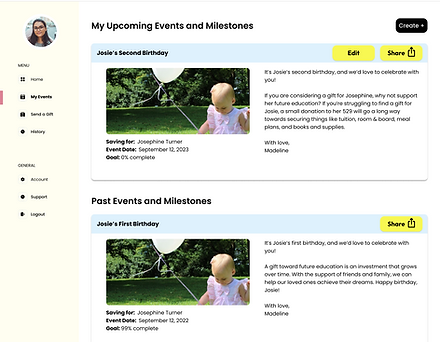
The new structure felt easier to navigate and gave users a much clearer sense of where things belonged.
Improving Onboarding
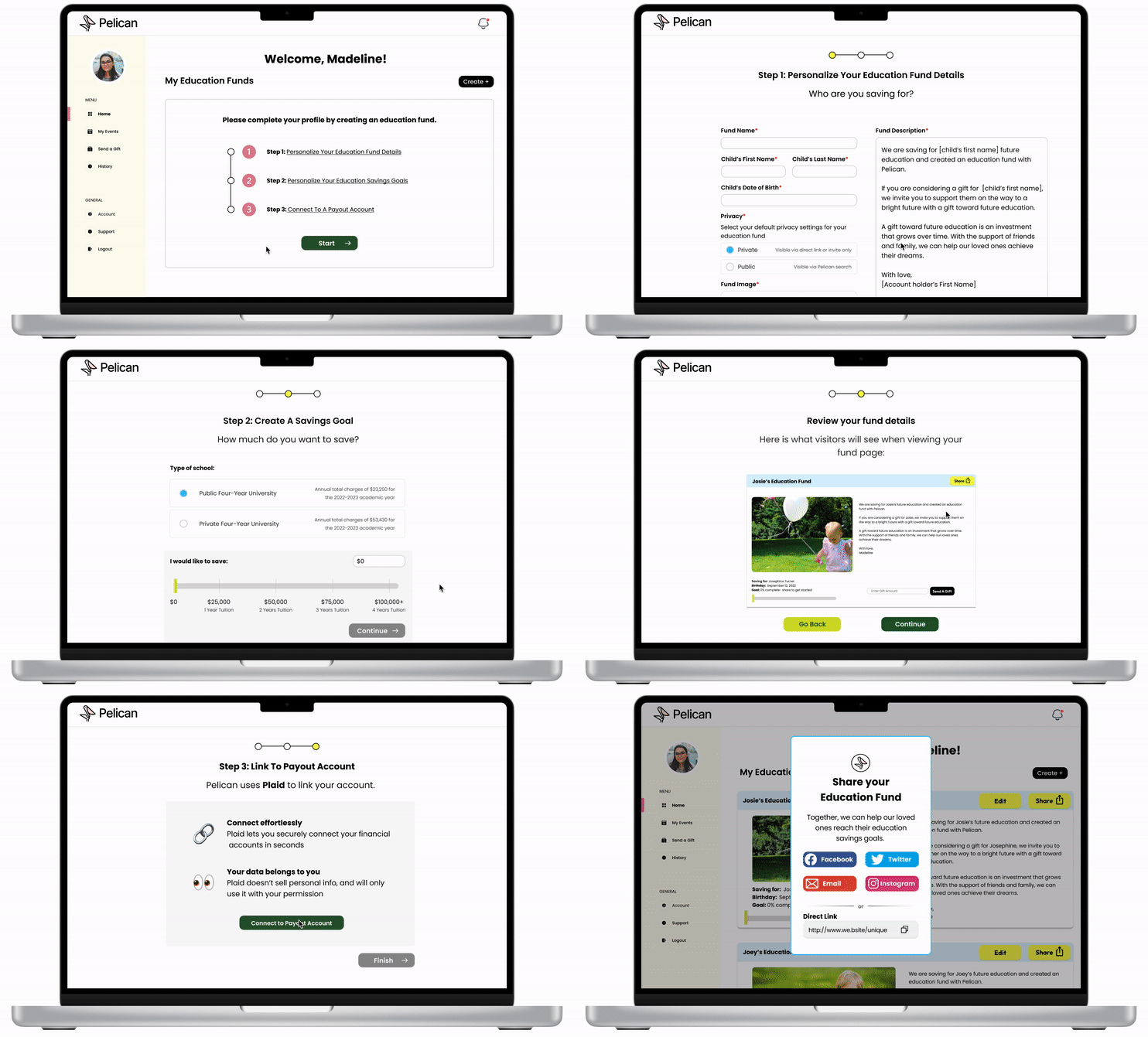
Once the dashboard structure felt more stable, we shifted focus toward onboarding and fund creation.
The original onboarding flow relied heavily on vague language and unclear savings goals. One slider used labels like “Just Getting Started” and “Sky’s the Limit,” but users consistently struggled to understand what those actually meant in practice. We redesigned the flow to include more concrete educational context around public and private university costs, 529-eligible expenses, and long-term savings expectations.
Instead of assuming users already understood the system, the redesign tried to meet them where they were.
Improved Search & Gifting
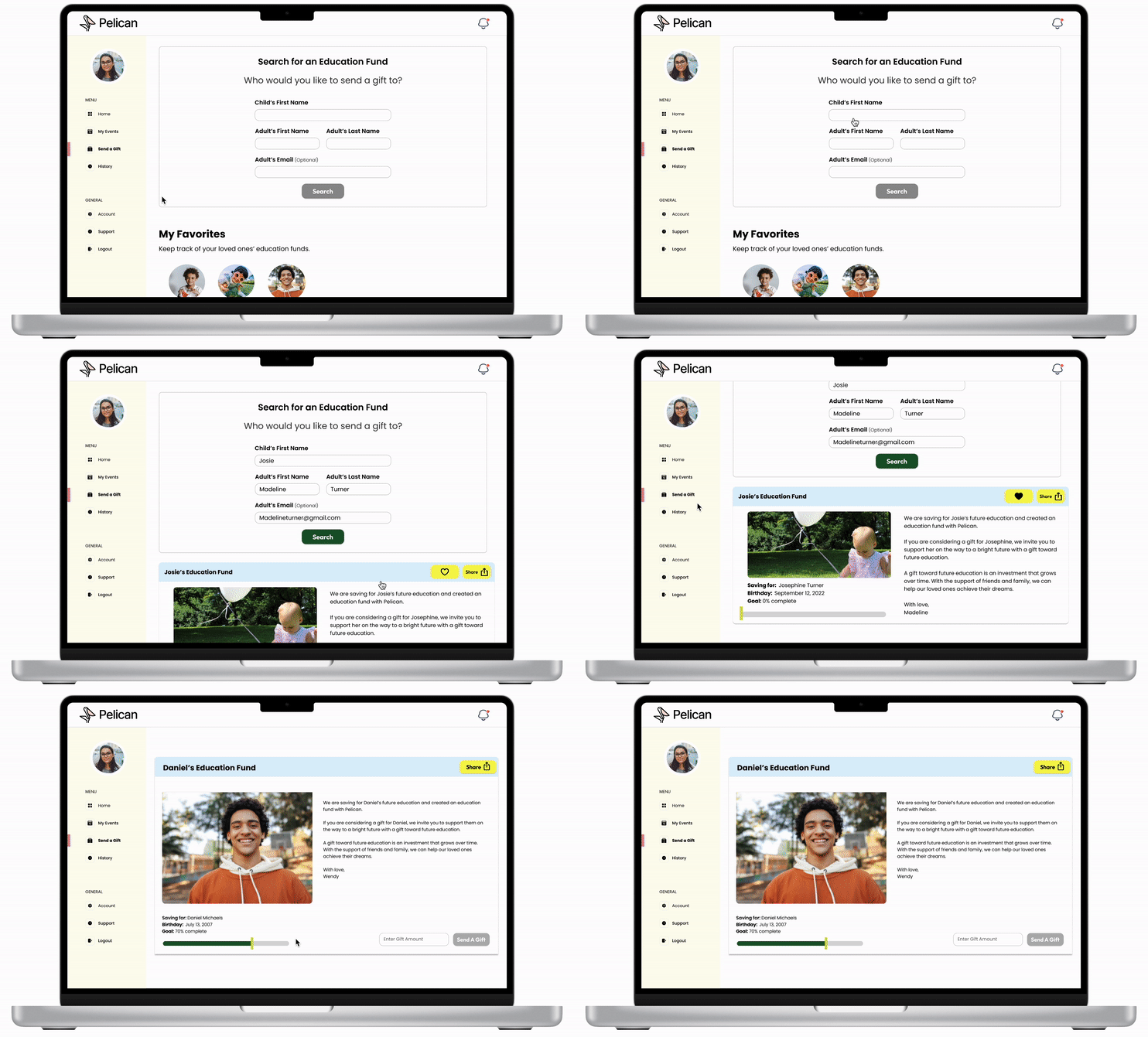
The original search experience created more friction than expected. Users struggled to locate profiles, the dropdown suggestions felt ambiguous, and there was very little guidance around what actions to take next.
None of our usability testers successfully completed the original search flow on their first attempt, and several failed the task entirely.
To simplify the experience, we introduced clearer search fields, stronger calls to action, and a more recognizable favoriting system using a heart icon instead of text-based interactions. The redesign tested much more successfully in our second round of usability testing, with all participants completing the flow without assistance.
Outcome and Reflection
Our client requested a redesign of their dashboard to improve user experience and provide a more intuitive interface for their customers. This project required thinking beyond individual screens to understand how users interact with the platform over time and across different roles. Over the course of a two week sprint, our team took on the challenge and successfully designed a dashboard to support ongoing engagement and help users track progress towards long-term financial goals. The redesigned dashboard now offers enhanced usability, allowing Pelican's users to easily access and manage their information with greater efficiency and satisfaction.